Case study
How MAS gave 100 volunteer consultants their own AI assistant — without giving them new tools to learn
A research and lookup partner grounded in MAS’s own data and scoped to who each volunteer is. Built into the VC Portal volunteers already log into.
MAS is a Canadian charity that runs on donated time. About a hundred senior business volunteers — VCs — give hours that don’t get billed, helping small nonprofits with strategic planning, fundraising, governance, communications, and operations. In a charity built on donated time, every minute lost to wrestling with bad tools is a minute not spent advising the client.
The volunteer consultants at MAS were spending real time hunting through CiviCRM, SharePoint, the Resource Library, and masadvise.org for client history, process docs, and policies. New volunteers struggled most — without a single place to ask, ramp-up was measured in months. And there was a meta-problem: MAS advises nonprofits on how to adopt AI; doing that credibly meant MAS had to use AI itself.
So we built the volunteer consultants an AI assistant. But we did it carefully: mapped where time was actually being lost, constrained what the AI could see, and tested on a small group of trusted users before announcing. This is the story of that build, told plainly.
Management Advisory Service (MAS) is a Canadian charity that connects senior business volunteers — about a hundred of them — with small nonprofits that can’t afford management consulting. The volunteers help with strategic planning, fundraising, governance, communications, and operations. Clients pay a modest fee. The volunteers donate their time.
Three pillars hold MAS up: the volunteer consultants (VCs) themselves, the nonprofit clients they serve, and the shared platform — masadvise.org — that connects them. The chatbot lives on that platform, in a portal called the VC Portal that VCs already log into.
The first principle of the project was the same one Preet used for Allard Prize: we didn’t start with AI. We started with where time was being lost. Five steps:
- Map what a VC actually does on a typical engagement — intake, client research, deliverables, handoff.
- Identify where they lose time — hunting for case history in CiviCRM, finding the right MAS process doc on SharePoint, looking up policies on the website, asking the same questions in volunteer Slack channels week after week.
- Prioritize the painful, low-judgment work — the lookups, the formatting, the “remind me what we said about X.”
- Name the immediate need — give VCs one place to ask, with answers grounded in MAS’s own information.
- Then, and only then, ask how AI could help.
Note what’s missing from that list: AI was not in step 1, step 2, or step 3. It only entered after we knew exactly what problem we were trying to solve.
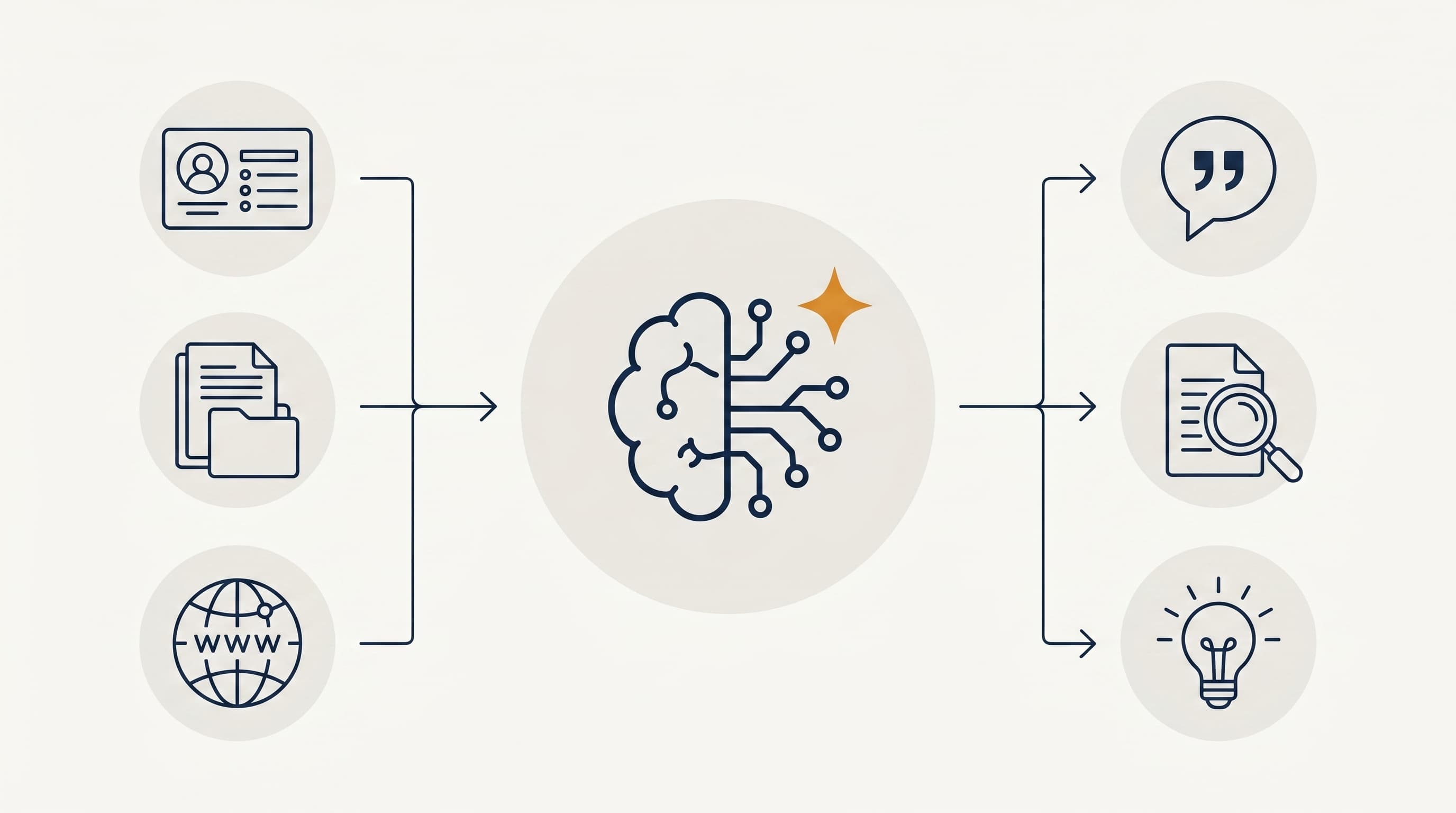
The system has three parts: inputs, processing, and outputs.
Inputs
The chatbot draws from three kinds of source:
- · MAS data (CiviCRM) — contacts, cases, who-worked-with-whom, project history
- · MAS knowledge — SharePoint VC Support Centre, Resource Library, masadvise.org content, Google Drive PDFs
- · External knowledge — nonprofit-AI guidance from ai.ccndr.ca, used to answer “how could AI help my client?”
The CRM access is read-only. The chatbot cannot edit, delete, or create CiviCRM records. It also enforces a per-VC scope: each VC sees only the cases they’re working on, plus unassigned projects available for them to take. The AI doesn’t decide that — a rule does, sitting between the AI and the data.
Processing
When a VC types a question, an AI agent picks the right tool for the job: a CRM lookup, a knowledge-base search, a web search of the client’s site. It gathers the results and writes a plain-English answer with the sources visible. The VC can click through to verify any claim.
The agent is built around a few constraints:
- · Tools, not free-form access. The AI doesn’t write database queries — it calls a small set of named tools that the rules can audit.
- · Scoped data, every time. No matter how a question is phrased, the per-VC scope filter is applied before any data leaves CiviCRM.
- · Sources visible. Every answer cites where it came from. If there’s no source, the answer says so.
Outputs
The VC gets, depending on what they asked:
- · A direct answer with citations — for “what’s our intake process?” or “who’s worked with this client?”
- · A consolidated brief — when researching a new client, combining CRM history with information from the client’s own website
- · A brainstorming partner — for “how should I approach this engagement?” or “what could AI do for this client’s work?”
What it does not output: messages sent on a VC’s behalf, edits to MAS records, or recommendations the VC didn’t ask for. The chatbot is a research and drafting partner, not an autonomous agent.
After several weeks of running the system with a small group of VCs, three benefits stand out — observed on the user side, expected on the organizational side:
- More advisory hours per donated VC hour. Less time hunting context, more time on the client’s problem. In a charity where capacity is volunteer time, that’s the metric that matters.
- New VCs ramp up in weeks, not months. The chatbot answers the questions a senior VC used to field over Slack. Senior VCs get their time back, and new VCs become effective faster.
- AI credibility — earned, not claimed. When MAS advises a nonprofit on adopting AI, it now points to a tool MAS uses every day.
Notice what’s not on this list: replacing the VC’s judgment, automating client communications, or eliminating MAS staff roles. The system is a research and drafting layer, not an oracle.
- Time
- Mostly upfront — defining what should and shouldn’t be in scope, ingesting and structuring the knowledge base, iterating on what the AI is allowed to do. Ongoing: monitoring feedback and tuning.
- Money
- Single-digit dollars per VC per month for AI calls. No new enterprise software. The chatbot lives on the same WordPress site MAS already runs.
- Maintenance
- Refreshing the knowledge base when MAS documents change. Tightening the rules when the AI gets something wrong. Watching the thumbs-up / thumbs-down feedback.
The honest summary: AI is not plug-and-play. It requires intentional design and ongoing calibration. The model is the cheap part. The work is in the scoping, the data, and the calibration.
This is the question every nonprofit asks first, and rightly so. CRM data — even just contact and case data — is a position of trust. Five principles shaped how the system handles it:
- · Read-only access. The chatbot cannot modify a single CiviCRM record. Anything that needs to change still goes through MAS staff.
- · Scoped by user. Each VC only sees what they’re permitted to see — their own cases plus unassigned projects. The scope is enforced in infrastructure, not just in the AI’s prompt.
- · Public or controlled inputs. The knowledge base is built from MAS-owned documents and the public MAS website. No sensitive client data is ingested into the AI’s memory.
- · Review before action. Drafts and recommendations are starting points for a human, not finished outputs. The chatbot doesn’t email anyone.
- · Documented AI policy. What the chatbot can and can’t do is written down, so trust isn’t dependent on any one person remembering it.
Safety by design. Trust by default.
The pattern — give a defined audience a single place to ask, grounded in your own data, scoped by who they are — generalizes well beyond volunteer consultants. Other places it could fit:
- · A client-facing chatbot for a nonprofit’s public website, helping prospective clients understand what the org does and how to engage.
- · A board portal assistant for member directors, surfacing meeting history, policies, and decisions.
- · A donor or member assistant for any nonprofit using CiviCRM — “what’s the giving history of this household?” or “which volunteers have done this kind of project before?”
- · Onboarding support for new volunteers, walking them through orientation interactively.
- · Process search across any document library larger than people can hold in their heads.
The MAS VC chatbot is one application of this pattern. Most mid-sized nonprofits have at least three.
The system is live with a small group of trusted VCs. The road ahead has two stages:
- · Soft launch with 30 VCs from the VC Portal, with structured feedback collection so we can see exactly which questions the chatbot handles well and which need more work.
- · Refine and expand — better client-research tools, VC-client skills matching, persistent conversation history, and eventually a public client-facing chatbot built on what we learn here.
Start narrow. Earn trust. Then widen.
- Find the time-sink first. Don’t ask “where can we use AI?” Ask “where are we losing time on work that’s important but low-judgment?” The answer is your starting point.
- Constrain the data before constraining the AI. A read-only, per-user-scoped data layer is worth more than any prompt-engineering trick.
- Build for one audience first. A chatbot for “everyone at the nonprofit” is harder to design than one for “the 30 volunteer consultants who use the portal.”
- Make the sources visible. If the AI can’t cite where its answer came from, the user shouldn’t trust it. Neither should you.
- Plan to maintain it. A chatbot grounded in your knowledge base is only as good as the knowledge base. Plan the upkeep before launch.