Case study
What a real AI assistant looks like — and why it matters for nonprofits
A personal AI assistant with persistent memory, sitting on top of the tools I already use. Built and used daily to inform how I advise nonprofits on adopting AI.
I work at MAS as a technology advisor. My job is to help Canadian nonprofits adopt AI — and that means staying ahead of a field that changes weekly, and showing nonprofit leaders concretely how AI fits their work, not someone else’s.
The path of least resistance — generic chatbots — falls short for that job. Every conversation starts at zero. Your work history lives in someone else’s walled garden. Useful for twenty minutes, then forgotten.
So for the past year I’ve been building and using something I call Klaus — a personal AI assistant that knows my work, persists my context, and grows alongside it. This case study is the story of what it is, what it cost, and why the pattern matters for any nonprofit thinking seriously about AI.
Klaus isn’t a product you can buy. It’s a pattern — three pillars hold it up:
- Persistent memory. Klaus remembers what’s happening across my projects, decisions I’ve made, and conversations I’ve had — in a database I own.
- Connected to my tools. Klaus reads from and writes to my files, my code, my notes, my task list — the systems my work already lives in.
- My data, my systems. Nothing important is locked inside the AI vendor. The AI is the engine. The data is mine.
The most common mistake nonprofits make with AI is starting with the tool: “We should use ChatGPT for…” When I built Klaus, I deliberately did the opposite. Five steps:
- Map my actual work — advising nonprofits, staying current on AI, building tools (workshops, chatbots, case studies) to help leaders imagine how AI fits their organization.
- Identify where the field’s pace exceeded my human capacity — keeping up with weekly capability shifts, drafting outreach faster than I could from scratch, retaining lessons across nonprofit conversations.
- Prioritize the proactive gaps — no daily AI-news triage, no persistent memory across sessions, no compounding pattern recognition.
- Name the immediate need — an assistant that could learn me over time and surface what I needed to know.
- Then, and only then, ask how AI could help.
The point of that order is to keep the technology in service of the work. If I’d started with “let’s use AI,” I’d have built another stateless chatbot.
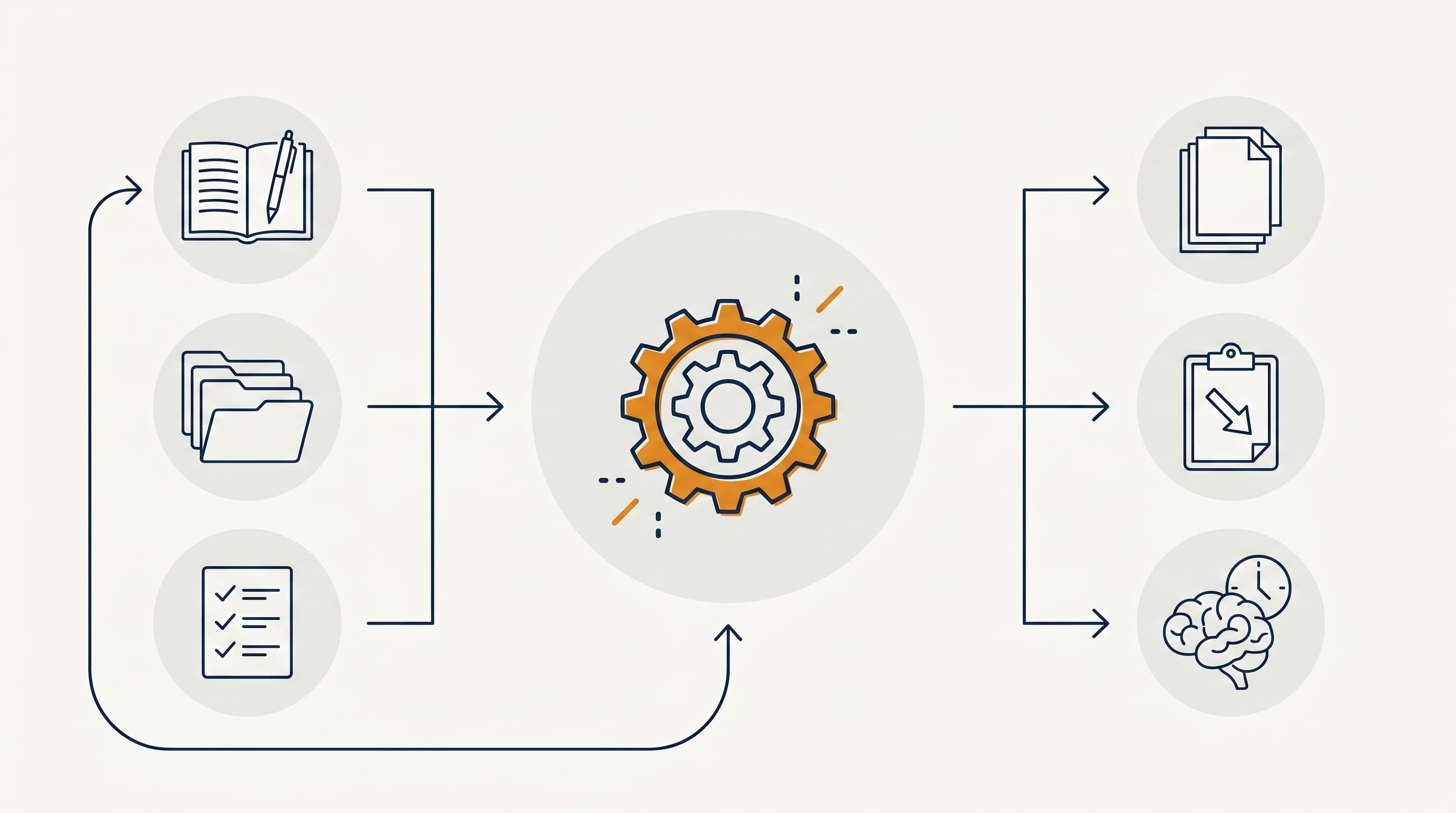
Klaus has three parts: inputs, processing, and outputs.
Inputs
Klaus draws from three kinds of source:
- · Memory — notes, decisions, prior conversations — in a Postgres database I own
- · Files — my GitHub repositories, my Obsidian notes, my Google Drive
- · Tasks — a to-do list, conversation handoffs that carry context across sessions, automated background jobs
Critically, none of this is stored inside the AI vendor. It’s stored in systems I control. The AI sees what I send it for a given conversation, then forgets. The persistence is in my database.
Processing
When I start a conversation, Claude reads what’s relevant, drafts what I need, and uses small tools to touch my real systems — read a file, append a task, log a decision, query a database. Some of those tools run on demand; others run in the background while I sleep, monitoring AI capability shifts, scoring articles, and drafting summaries.
The agent is built on a few principles:
- · The AI is the engine, not the database. I never put my data inside the AI vendor’s memory features. Everything important lives in systems I own.
- · Tools, not free-form access. Claude calls a small set of named tools that I built. Each tool is auditable.
- · Working memory, not perfect memory. Klaus doesn’t try to “remember everything.” It writes down what matters, and re-reads it next session.
Outputs
Day-to-day, Klaus produces three kinds of artifact:
- · Knowledge base documents — research summaries, enhancement specs, strategy docs. The body of writing that informs my MAS advisory work.
- · Tasks and handoffs — a prioritized list of what to do next, with full context attached so I can pick up tomorrow where I left off today.
- · Long memory — every architectural decision, every “we tried that and it didn’t work,” findable months later.
What it doesn’t output: messages sent on my behalf without review, automatic CRM updates I didn’t authorize, or anything that pretends to be me to a third party.
After about a year of running Klaus daily, three benefits stand out:
- Keeping current. Daily briefings surface AI capability shifts I’d otherwise miss. A knowledge base of articles, tools, and talks builds itself in the background, scored against the topics I actually advise nonprofits on. Without Klaus, I’d lose half a day each week just to keeping up.
- Building outreach. I’m producing more substantive outreach to nonprofits — webinars, workshops, AI chatbots, public case studies like this one — and each new piece is faster because Klaus carries the context across them.
- Compounding judgment. Patterns from one nonprofit conversation surface when I’m prepping for the next. Lessons aren’t lost between sessions, and over time my advice gets sharper, not staler.
Notice what’s not on this list: more output, faster output, AI-doing-my-job-for-me. The value isn’t that Klaus does my work. It’s that Klaus removes the friction between me and my work, and surfaces what I’d otherwise miss.
- Time
- Significant upfront — deciding what to track, what to automate, what not to automate. Daily: a few minutes on a briefing, a few minutes wrapping up. Ongoing: architectural changes as my work evolves.
- Money
- Modest. AI-model usage plus a few cloud-service subscriptions. Built on tools I already paid for plus free open source.
- Maintenance
- Tuning the background jobs. Keeping the documentation honest. Letting the assistant improve itself, with checks I review.
The honest summary: AI is not plug-and-play. It requires intentional design and ongoing calibration. The model is the cheap part. The thinking around it is the work.
This is the question every nonprofit asks first, and the answer depends entirely on how the system is built. Five principles shaped Klaus:
- · My data lives in my systems. Postgres for memory, Google Drive for files, GitHub for code. The AI vendor doesn’t store any of it.
- · Auditable connections. Every read and write Klaus does is logged. I can see exactly what was sent and received.
- · The AI sees only what I send. I control what context goes into each conversation. Anything sensitive I don’t want shared, doesn’t go.
- · No client data without consent. Same rule I’d apply to a paper file. Confidential information isn’t fed into AI tools without the client’s permission.
- · Clear AI boundaries. Klaus drafts; I send. Klaus suggests; I decide. Nothing leaves my computer addressed to a real person without a human review.
This is fundamentally different from pasting donor data into a public chatbot window. That approach does send data to a third party, and often into model training. A well-designed AI assistant doesn’t need to.
Safety by design. Trust by default.
Even without Klaus’s specific architecture, the underlying pattern — AI on top of YOUR data, scoped to YOUR role, drafting from YOUR context — applies broadly:
- · A development director who can ask her assistant “what do we know about this donor’s giving history and interests?” and get a briefing pulled from the CRM, ready for a call.
- · An executive director who dictates notes after a board meeting and has them automatically organized, stored, and linked to the relevant strategic plan items.
- · A program manager who can ask for a summary of all the outcome data collected this quarter, drafted in the format needed for the funder report.
- · A communications lead who drafts grounded in the organization’s actual voice and mission, not a generic AI’s guess at it.
- · An operations lead with one place to ask “what’s our policy on…?” across the whole document library.
None of this requires the organization to replace its existing systems. It requires building a thin layer of AI on top of what already exists.
Klaus is at the start of a longer arc, not the finish line.
- More outreach formats. The webinars, workshops, and chatbots I’m building for nonprofits are all built on top of Klaus. Each new format teaches me something I feed back in.
- Open-sourcing the pattern. What I’ve built isn’t proprietary. Over the coming year I’m working toward making this something other nonprofits (or technical leads at one) can adapt for their own work, without having to start from scratch.
Building something like this for a nonprofit isn’t a weekend project, but it’s also not a multi-year enterprise software implementation. With the right technical partner, a useful first version can be operational in a few weeks — starting with the area where staff lose the most time to repetitive, information-management work.
The AI is the easy part. The thinking around it is the work.
- Live it before you teach it. If you’re advising others on AI, build something small for yourself first. The lessons that translate are the ones that survive contact with real work.
- Find the time-sink first. “Where can we use AI?” is the wrong question. “Where are we losing time on important-but-low-judgment work?” is the right one.
- Keep your data in your systems. Anything important should live where you control it. AI is the engine, not the storage.
- Build for one role first. A general-purpose assistant for everyone is harder than a focused one for the development director. Start narrow.
- Make every AI action reviewable. Drafts, not sends. Suggestions, not decisions. At least until trust is earned.
- Plan to maintain it. AI assistants drift. Knowledge bases go stale. The system improves only if you keep working on it.